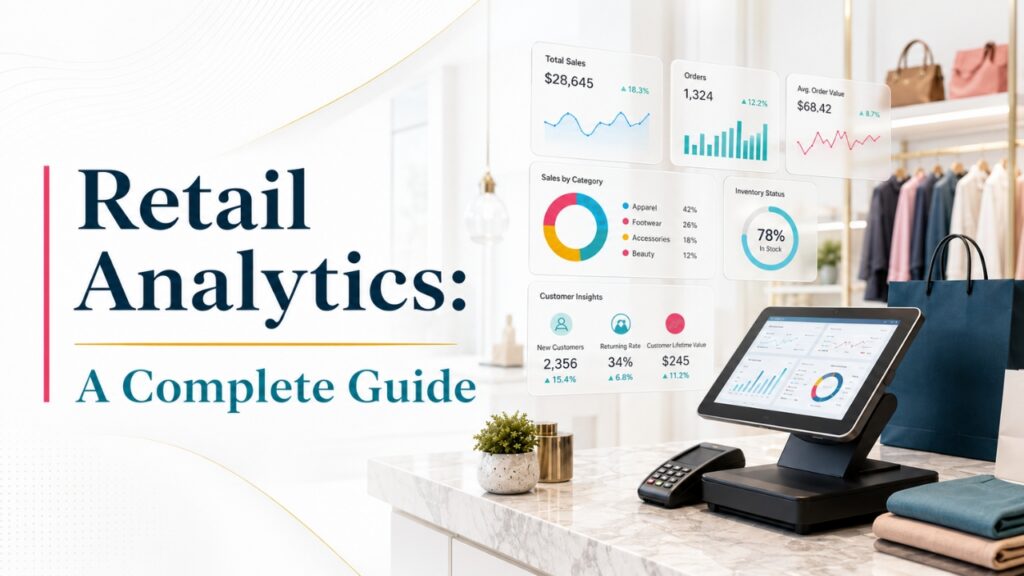
In this rapidly changing retail industry, retailers cannot make decisions based on their assumptions rather use data insights which is no longer optional if they want to stay competitive.
Using retail analytics software, businesses can collect, analyze, and interpret data from several sources to a centralized platform to understand customer behavior, optimize inventory, improve sales, and increase profits.
Whether you are running a single retail store or managing multiple retail stores, it is essential to use Retail Analytics software which helps them to make informed decisions that drive sustainable business growth.
Every large volume of data is generated from Point-of-Sale(POS)systems, eCommerce platforms, inventory management software, customer relationship management(CRM)systems, loyalty programs, and marketing campaigns.
Then the retail analytics software collects data from multiple sources and converts it into actionable insights. These insights help retailers to identify sales trends, forecast customer demand, improve pricing strategies, reduce operational costs, and deliver personalized shopping experiences.
As customer expectations keep changing, retailers have to use these insights effectively to change market conditions and have a competitive advantage over competitors.
This Retail Analytics: A Complete Guide will walk you through everything you need to know about Retail Analytics like the way it works, its advantages, different types of analytics, important retail metrics, implementation best practices which is shaping the retail industry.
We will throw some light on the way AI-based analytics improves decision-making and why it is essential to adopt a data-driven approach for achieving long-term success.
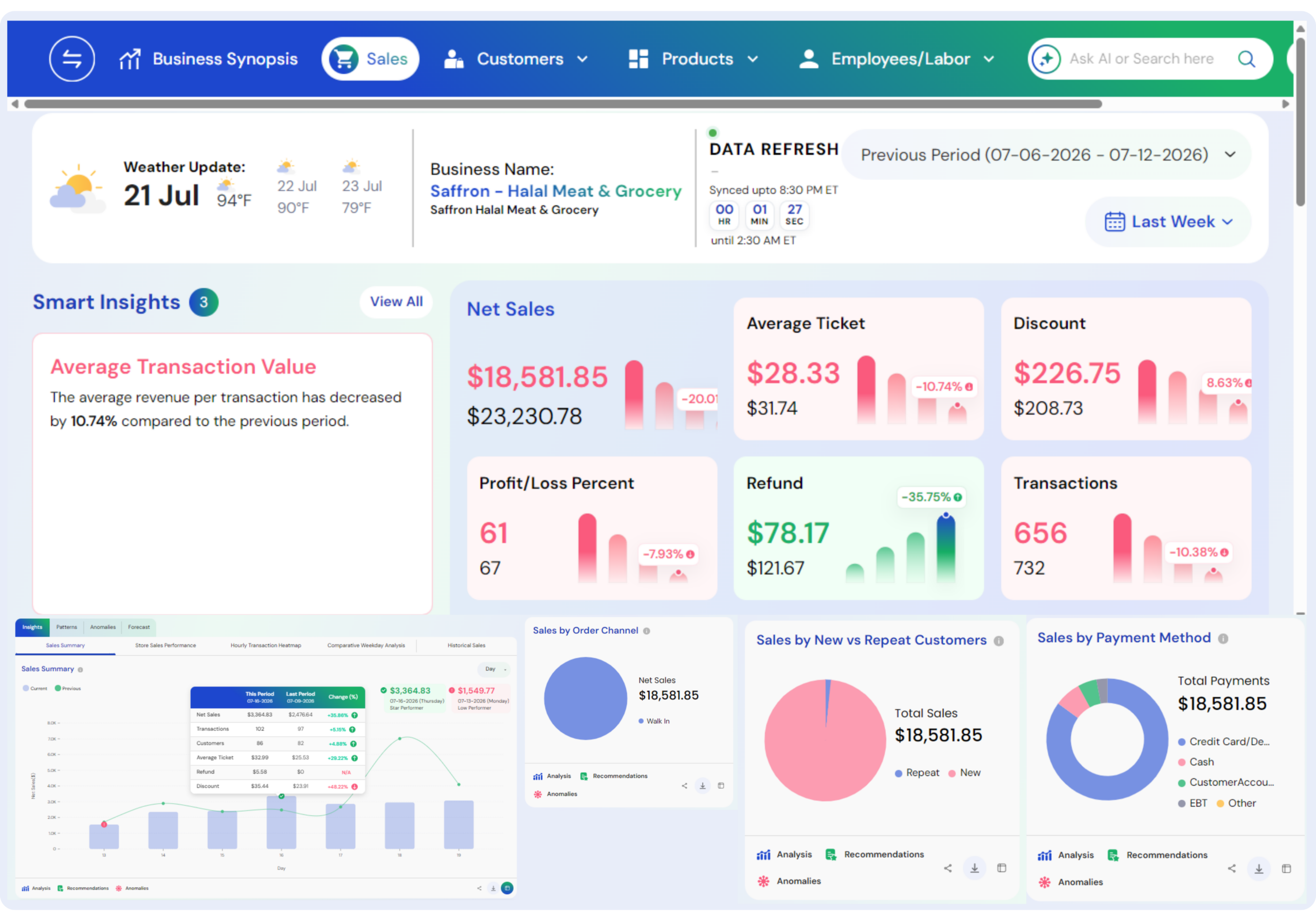
Platforms like Livelytics make retail analytics more powerful by integrating data from multiple business systems into a single and easily understandable dashboard.
With real-time reporting and actionable insights, Livelytics helps retailers to track key performance indicators(KPIs), improve operations, improve customer experiences, and make smarter business decisions that support long-term growth.
Also Read: Advantages of Business Intelligence in Retail Industry
What Is Retail Analytics?
It is the process of collecting, organizing, analyzing, and interpreting retail data to improve business performance which enables them to make better decisions.
This analysis helps retailers to understand crucial business aspects of operations like sales performance, inventory levels, customer behavior, pricing strategies, employee productivity, and marketing effectiveness.
Businesses by using data-driven insights rather than assumptions helps businesses to identify patterns, find business growth opportunities, and make smarter operational decisions.
Retail analytics collects data from multiple sources like:
- Point-of-Sale(POS) systems
- Inventory management software
- eCommerce platforms
- Customer Relationship Management(CRM) systems
- Loyalty programs
- Marketing campaigns
- Mobile applications
- Financial systems
Integrating data from different sources into a centralized platform helps retailers to gain a detailed view of their business, that helps them to improve operations, customer experiences, increase profits, and make rapid and more informed decisions.
Also Read: Two Way Data Analytics in Shaping the Retail Businesses
Why Is Retail Analytics Important?
Large volumes of retail data is generated every day from each sale, product return, customer interaction, online search, and marketing campaigns.
If their data is not properly analyzed then this valuable data cannot be used to ensure business growth. Retail analytics converts raw data into actionable insights which helps retailers to make informed decisions, improve operations, and respond quickly to changing customer demands.
Some of the important benefits of retail analytics include:
- It helps to understand customer buying patterns and preferences
- It helps to identify best-selling and slow-selling products
- It helps to improve inventory levels and reducing stockouts
- It helps to avoid overstocking and reducing inventory expenses
- It helps to improve pricing and promotional strategies
- It helps to track marketing campaign performance
- It helps to increase operational efficiency across stores
- It helps to improve customer satisfaction and loyalty
- It supports accurate forecasting and long-term business planning
When retailers use analytics software consistently have more chances to adapt to changing market trends, improve profits, and provide exceptional customer experiences.
Also Read: The Future of Restaurant and Retail Decision Intelligence
How Does Retail Analytics Work?
Retail analytics is an organized process which converts raw business data into impactful insights. Collecting and analyzing data from different business systems helps retailers to track performance, find business growth opportunities, and make informed decisions which improve operations and profits.
1. Data Collection
The initial step in retail analytics is to collect data from multiple sources. These data sources are Point-of-Sale(POS)transactions, online orders, inventory records, customer profiles, supplier data, employee performance data, marketing platforms, and website analytics.
When this analytics software collects data from multiple sources provide a detailed view of business operations and helps to generate more accurate insights.
Also Read: Leveraging AI to Collect Customer Insights
2. Data Integration
After the data from multiple sources is collected, then it should be integrated into a centralized analytics platform. This step removes data silos and provides a single centralized dashboards where retailers can view sales data, inventory levels, customer data, and financial reports in one place.
Having a centralized dashboard helps managers to improve collaboration and also lets them make rapid decisions.
Also Read: Benefits of Data-Driven Decision Making
3. Data Cleaning
Before analysis begins, the data collected is cleaned so that insights provided are accurate and consistent. Because any duplicate customer records, missing product details, incorrect pricing data, and valid transactions are identified and removed
Having clean, high-quality data increases the reliability of reports and reduces chances of errors in business decisions.
Also Read: Automating Data Analysis Using Artificial Intelligence
4. Data Analysis
In this step, analytics tools analyze the cleaned data to find insights. These insights help restaurants to understand sales patterns, customer preferences, inventory levels, seasonal patterns, product performance, and marketing effectiveness.
Modern analytics platforms even use artificial intelligence(AI) and machine learning to find operation patterns, predict future customer demand, and give recommendations for improving business performance.
Also Read: How Businesses Are Adopting to AI in Decision Making
5. Reporting and Visualization
The final step in retail analytics is presenting insights through dashboards, charts, reports, scorecards, and key performance indicators(KPIs). These reports simplify complex data which can be easily understood by managers and business leaders to make timely, data-driven decisions which support retail success for long-term.
Also Read: How Restaurant Analytics and Reporting Drive Better Decision Making
Types of Retail Analytics
There are four main categories in retail analytics and each category helps retailers to provide answers for different business queries.
All these analytics types help businesses to understand past performance of operations, identify the causes of business outcomes, predict future trends, and make data-driven decisions that improve profits and customer satisfaction.
1. Descriptive Analytics
Such analytics explains what happened by analyzing past business data. It presents past performance data through reports and dashboards, which help retailers to understand crucial metrics like monthly sales, revenue patterns, product sales, store performance, and customer purchases.
Analytics software reviews past data that provides insights to businesses that helps them to identify successful strategies, track key performance indicators(KPIs), and measure overall business performance.
Descriptive analytics is the foundation for all other types of retail analytics as it gives a detailed view of current and past operations.
Also Read: How to Choose the Right Restaurant Data Analytics Solution
2. Diagnostic Analytics
This analysis answers the question, “Why did it happen?”. It analyzes past data to reveal the factors which impact business results.
Retailers use diagnostic analytics to find reasons behind declining sales, inventory shortages, reduced customer traffic, unsuccessful marketing campaigns, or differences in product performance.
When businesses identify the main causes of these issues, then businesses can resolve operational problems, improve decisions, and find opportunities for growth.
Such analytics help retailers to understand how different business activities are connected and their outcomes.
Also Read: How AI Unlocks Business Insights that Drive Required Results
3. Predictive Analytics
This analytics uses past data, statistical models, artificial intelligence(AI), and machine learning to predict future business outcomes. Predictive analytics helps retailers to predict future customer demand, seasonal sales patterns, inventory requirements, customer purchasing behavior, product trends, and revenue growth.
These forecasts help businesses to prepare for market changes, improve inventory levels, improve financial planning, and reduce operational risks.
Predictive analytics supports better marketing strategies by finding future customer preferences and purchasing patterns before they happen.
Also Read: Predictive Analytics in Restaurants a Game Changer
4. Prescriptive Analytics
Prescriptive analytics recommends the best actions retailers must take to achieve their business goals. Instead of simply predicting future events, this analytics provides actionable recommendations using advanced AI-based algorithms.
Instances include finding optimal inventory levels, recommending pricing strategies, creating personalized promotions, improving staff scheduling, and improving product assortments.
Combining both predictive insights with intelligent recommendations, prescriptive analytics helps retailers to make proactive decisions, improve operations, improve customer experiences, and maximize profits in an increasingly competitive retail environment.
Also Read: The Future of Restaurant Retail Decision Intelligence
Key Data Sources for Retail Analytics
Achieving maximum success through retail analytics platforms depends on collecting accurate and reliable data from multiple business systems.
Combining data from multiple data sources, retailers gain a complete view of their operations that help them to make informed decisions, improve efficiency, and provide better customer experiences.
1. Point-of-Sale (POS) Systems
One of the main sources of data for retail analytics is Point-of-Sale(POS) systems. POS systems collect transaction details like total sales, discounts, refunds, product purchases, and average order value.
All this data helps retailers to track sales, find popular products, and analyze customer purchasing patterns.
Also Read: POS Reports Vs Real-Time Analytics
2. Inventory Management Systems
Inventory management systems provide inventory details like stock levels, inventory turnover, supplier performance, product availability, and reorder points.
All this data helps retailers to avoid stock shortages, reduce overstocking, improve inventory levels and efficiencies of supply chains.
Also Read: AI for Retail Inventory Management
3. Customer Relationship Management (CRM) Systems
CRM platforms provide customer details like purchase history, contact details, customer preferences, and program participation levels.
All this data helps retailers to understand customer behavior, personalize marketing campaigns, improve customer relationships, and customer retention levels.
Also Read: Customer Sentiment Analysis Vs Traditional Surveys
4. eCommerce Platforms
Online stores generate valuable insights like website traffic, product views, conversion rates, customer browsing behavior, and online sales performance.
These details help retailers to improve digital shopping experience and increase their online revenue.
Also Read: Choosing the Right AI Data Platform for Your Business
5. Marketing Platforms
Marketing platforms track performance of marketing campaigns done through social media, emails, paid advertising, and promotional activities.
These platforms provide different data such as customer engagement, click-through rates, conversions, and customer acquisition costs that helps retailers to improve their marketing strategies.
Also Read: Business Intelligence for Marketing
Benefits of Retail Analytics
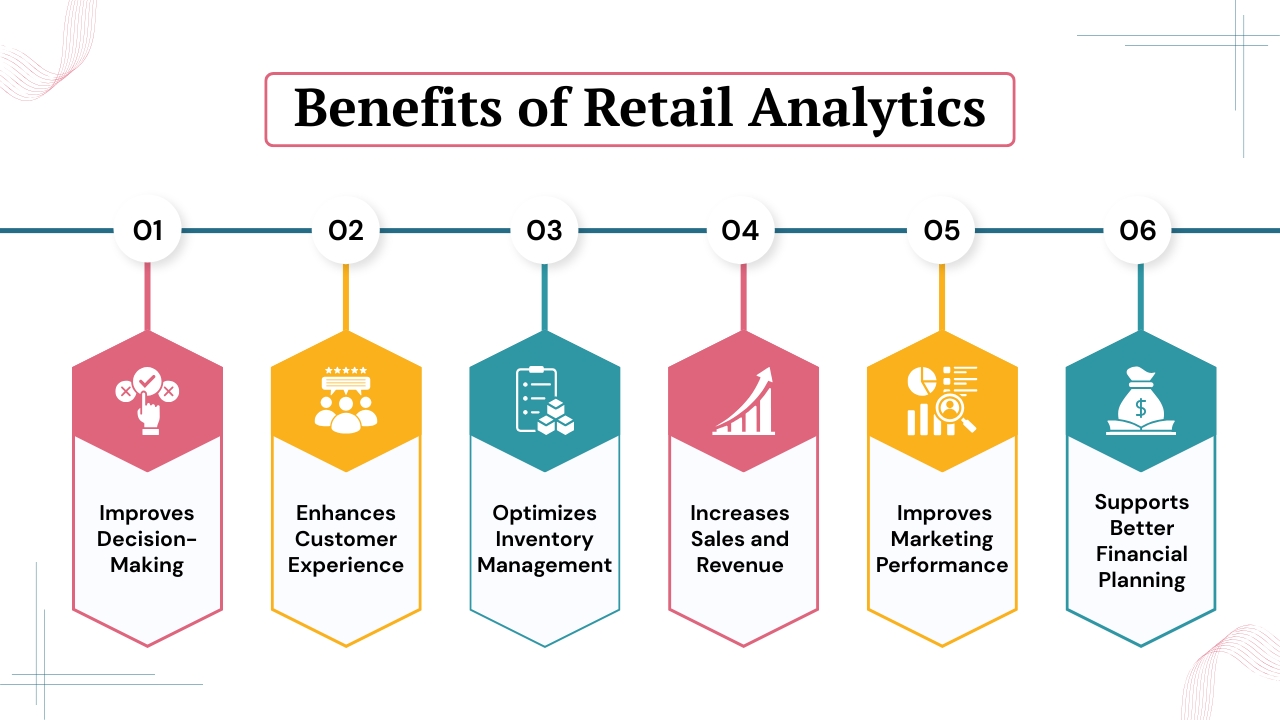
Retail analytics helps businesses to transform raw data into actionable insights that helps retailers to improve decisions, operations, customer satisfaction, and profits.
Analyzing data from multiple business systems helps retailers to find opportunities, resolve challenges, and support long-term business growth.
1. Improves Decision-Making
It helps retailers to make informed decisions based on data rather than assumptions. Analyzing sales, customer behavior, inventory, and financial performance helps retailers to find the products that need the most promotion, allocate budgets well, and know the performance of each store.
Also Read: Business Intelligence and Data Analytics Services
2. Enhances Customer Experience
These software give insights about customer purchasing, shopping frequency. These insights help retailers to provide personalized recommendations, targeted promotions, and improve customer services.
Also Read: How AI Revolutionizes Customer Experience in the Restaurant Industry
3. Optimizes Inventory Management
These analytics software helps businesses to track inventory, predict customer demand, avoid overstocking, stock shortages, and improve stock reordering.
By effectively managing inventory retailers can reduce inventory expenses, and also ensure that the products remain available when customers require them.
Also Read: AI for Restaurant Inventory
4. Increases Sales and Revenue
These software identifies top-selling products, successful promotions, and profitable sales channels that help businesses to increase revenue.
This analysis helps retailers to improve products, pricing strategies, and develop cross-selling and upselling opportunities that encourage higher customer spending.
Also Read: Restaurant Sales Forecasting How to Predict Future Revenue
5. Improves Marketing Performance
It helps retailers to monitor the effectiveness of marketing campaigns by tracking customer acquisition expenses, conversion rates, email engagement, social media performance. These insights help businesses to improve marketing performance and campaign results.
Also Read: AI for Restaurant Marketing
6. Supports Better Financial Planning
These software give accurate financial insights that support budgeting, track revenue growth, expenses, profits, future sales, and manage cash flow effectively that helps for business growth and improves financial performance.
Also Read: Restaurant Profit Margin Analytics Tool to Boost Profits
Essential Retail Analytics Metrics and KPIs
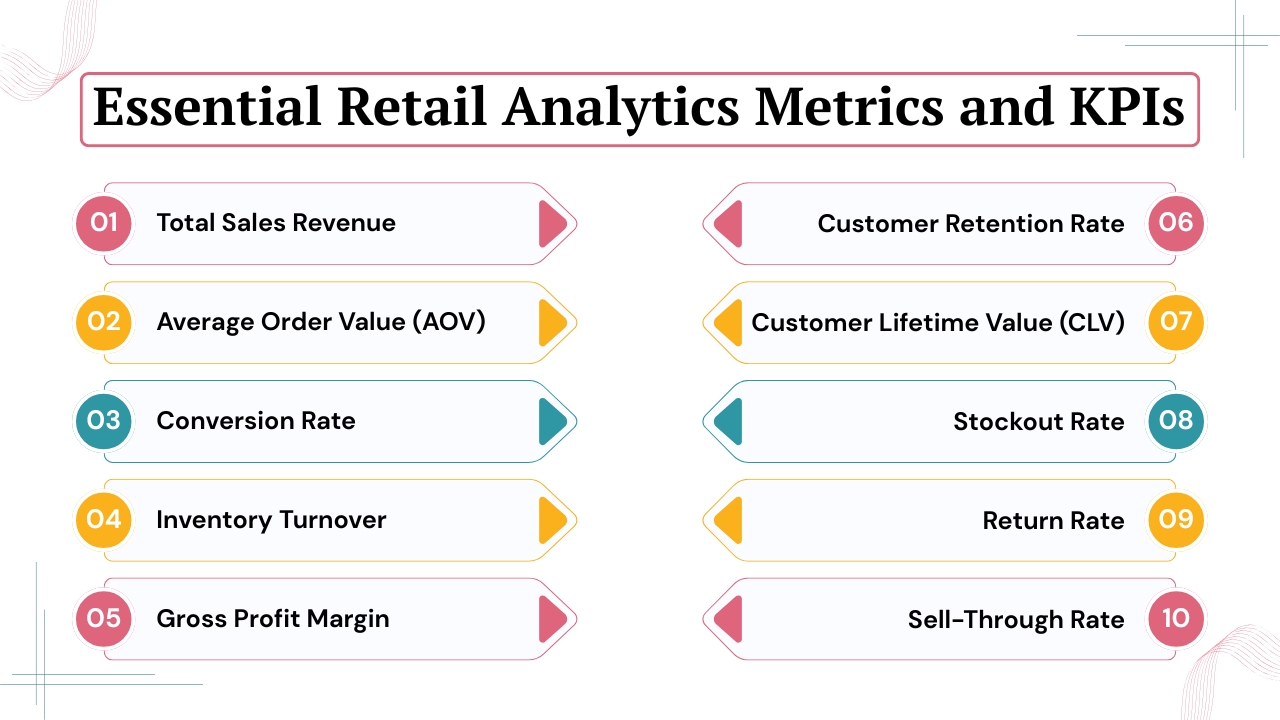
Tracking the right Retail Analytics KPIs helps businesses to track their business performance, find areas of improvements, and make informed decisions.
Below are some important metrics that provide valuable insights into sales, customer behavior, inventory, and overall business performance.
1. Total Sales Revenue
It tracks the total revenue earned from product sales during a certain period. This metric helps retailers to analyze overall business performance and track the increase in revenue with time.
Also Read: How AI Helps in Boosting Restaurant Revenues and Profits
2. Average Order Value (AOV)
It measures the average amount spent by customers per each transaction. This is calculated by dividing total sales revenue by the number of orders.
Also Read: How Inventory Software for Restaurants Reduces Food Costs
3. Conversion Rate
It measures the number of customers who complete a purchase. If there is a higher conversion rate, it shows effective pricing, product offerings, and customer experience.
Also Read: AI for Restaurant Marketing for Maximum Conversions
4. Inventory Turnover
It measures how quickly products are sold and replenished. While a high turnover rate helps to reduce storage expenses and improve cash flow.
Also Read: How Inventory Software for Restaurants Reduce Food Costs
5. Gross Profit Margin
It measures the remaining profit after deducting the expenses of goods sold. Higher profit margins show stronger pricing strategies and better operations.
Also Read: Big Data Analytics for Restaurants Turning Data into Profit
6. Customer Retention Rate
It measures the way a business successfully keeps existing customers. Higher customer retention rates show strong customer satisfaction and effective loyalty programs.
Also Read: Customer Analytics for Restaurants
7. Customer Lifetime Value (CLV)
It measures the total revenue a customer generates throughout the business. It helps retailers to improve customer acquisition and customer retention strategies.
Also Read: Customer Sentiment Analysis for Multi-Location Business
8. Stockout Rate
It measures the way products are unavailable for customers. Lower stockout rates improve customer satisfaction and reduce chances of lost sales opportunities.
Also Read: Restaurant Performance Metrics Every Restaurant Owner Must Track
9. Return Rate
It measures the percentage of products returned by customers. Tracking this metric helps to identify product quality issues and improve customer experience.
Also Read: How AI is Improving Table-Turnover Rate in Restaurants
10. Sell-Through Rate
It measures the amount of inventory sold as compared to the quantity received. This helps retailers to evaluate product demand, inventory planning, and customer purchasing decisions.
Also Read: How Livelytics Help Retailers Reduce Operational Costs
Retail Analytics Use Cases
Retail analytics supports decisions across different business functions by transforming data into actionable insights.
Whether improving sales performance, improving marketing strategies, retailers can use analytics to improve operations.
1. Sales Performance Analysis
Retail analytics software helps businesses to analyze sales performance across products, stores, regions, employees, categories, and time periods.
Comparing these metrics helps retailers to identify best-selling products, top-performing locations, and sales patterns, that helps them to make informed decisions that drive revenue growth.
Also Read: How to Increase Restaurant Sales Without Advertising
2. Customer Behavior Analysis
Analyzing customer data helps retailers to understand customer buying habits, shopping frequency, their preferred products, seasonal purchasing patterns.
These insights enable personalized marketing campaigns, targeted promotions, stronger customer relationships, and improved customer loyalty programs.
Also Read: How Small Business Can Get Most Out of the Data Analysis
3. Inventory Optimization
Retail analytics helps businesses to monitor inventory levels, predict customer demand, and maintain optimal stock levels.
It helps retailers to reduce overstocking, avoid stock shortages, reduce storage expenses, and improve supplier planning, ensuring that products are available when customers need them.
4. Pricing Optimization
Retailers use analytics to adjust competitive pricing strategies by analyzing customer demand, competitor pricing, product profits, and seasonal patterns.
Dynamic pricing helps to increase sales, improve profits, and respond instantly to changing market conditions.
Also Read: Retail Pricing Strategy
5. Marketing Campaign Analysis
Retail analytics tracks the performance of email campaigns, paid advertisements, social media marketing, loyalty programs, and promotional offers.
Tracking crucial marketing metrics, helps retailers to find successful campaigns, improve marketing budgets, improve customer engagement, and achieve a higher return on investment(ROI).
Also Read: Mobile Marketing for Restaurants
AI and Machine Learning in Retail Analytics
Artificial intelligence(AI) and Machine Learning(ML) have changed the way of retail analytics by helping businesses to analyze large volumes of data quickly and accurately.
With these software retailers can identify patterns, make predictions, and automate decisions, enabling retailers to improve efficiency, improve customer experiences, and increase profits.
AI and machine learning can help retailers:
- Predict customer demand
- Recommend valid products
- Detect purchasing trends
- Improve pricing strategies
- Predict inventory requirements
- Identify fraud transactions
- Personalize marketing campaigns
- Automate reporting and analytics
Machine learning models consistently improve by learning from new data, which allow retailers to make more accurate predictions and respond effectively to changing customer preferences and market conditions.
Also Read: How Do Machine Learning and Artificial Intelligence Help Businesses
How to Implement Retail Analytics Successfully
Implementing retail analytics need careful planning, high-quality data, and a clear business strategy. Following an organized approach, helps retailers to get the maximum value of their analytics platform and make better business decisions.
1. Define Business Objectives
Analytics starts by finding main business goals. It may include sales revenue, improve management of inventory, reduce operational costs, improve customer satisfaction, improve employee productivity, increase customer retention, or improve marketing performance. With clear objectives businesses can find the reports and KPIs that need the most attention.
Also Read: How AI Helps in Boosting Restaurant Revenue and Profits
2. Integrate All Business Systems
The next step is to connect all major business systems which includes point-of-sale(POS) systems, inventory management software, CRM platforms, eCommerce websites, accounting software, marketing tools, and loyalty programs.
Integrating these systems helps to create a centralized source of accurate business data.
3. Collect Accurate Data
A dependable analytics software helps to depend on high-quality data. By removing duplicate records, standardizing product details, updating customer details, validating sales transactions, and regularly tracking inventory accuracy to ensure accurate insights.
4. Select the Right KPIs
Retailers must rely on important KPIs to align with their business objectives. Common retail KPIs are sales revenue, average order value(AOV), gross profit margin, customer retention rate, inventory turnover, conversion rate, and return rate.
5. Train Employees
It is essential to train employees how to interpret dashboards, understand reports, and apply data insights in their daily responsibilities. It encourages employees to early adopt this software and supports a data-driven culture.
Conclusion
Retail analytics has become an important tool for businesses who want to succeed in today’s competitive retail market. Collecting and analyzing data from sales, inventory, customer interactions, marketing campaigns, and financial systems, retailers can make informed decisions that improve operational efficiency and profits.
Instead of depending on assumptions, businesses can use real-time insights to understand customer behavior, improve inventory levels, improve pricing strategies, and measure overall performance.
As technologies such as artificial intelligence, machine learning, and predictive analytics keep evolving making retail analytics more powerful and accessible.
Companies that adopt a data-driven approach have high chances to adapt to changing customer expectations, respond to changing market trends, and deliver exceptional shopping experiences to customers.
Platforms like Livelytics simplify this process by integrating business data into one centralized platform helping retailers to track key performance indicators, generate impactful reports, and reveal actionable insights.
Whether you are running a single store or manage a multi-location retail business, investing in retail analytics helps to drive sustainable growth, increase customer satisfaction, and support long-term success.
If you still have any query about retail analytic then you may book a free demo and we are more than happy to assist you.