Introduction
The demand for faster, smarter decision-making has pushed businesses to rethink how they handle data. Traditional analytics are becoming a thing of the past.
Businesses are probably sitting on more data than ever before, including sales trends, customer feedback, inventory levels, booking rates, and more. The challenge? Turning all of it into meaningful, timely insights without spending hours buried in spreadsheets.
That’s where automated data analytics is changing the game.
Instead of manually compiling reports every week or chasing after numbers from multiple systems, businesses today are using automation to get real-time insights delivered straight to their dashboards.
Did you know, workflow automation can save companies anywhere from $10,000 to millions per year? The average company saves $46,000 annually.
In this blog, we’re taking a closer look at how automation works in modern business intelligence (BI), how it streamlines daily operations, and why businesses like yours are investing in it to make faster, data-backed decisions—with fewer manual steps.
Also Read: How Data Analytics Process Automation Help Businesses
What Is Automated Data Analytics?
Automated data analytics is the process of using technology, such as AI, machine learning, and business intelligence (BI) tools, to collect, clean, analyze, and visualize data with minimal human input.
It replaces manual workflows with rule-based or AI-driven processes that operate in real time or on set schedules. It helps businesses to uncover patterns, generate insights, and make data-driven decisions faster and more accurately.
Example:
A multi-location restaurant chain uses an automated BI platform to pull sales data from its POS systems daily. The tool automatically cleans the data, identifies slow-moving menu items, and updates a real-time dashboard showing which dishes underperform by location. Based on these insights, managers adjust menus and inventory—without needing to run manual reports.
Also Read: Automating Data Analysis Using Artificial Intelligence
Benefits of Automated Analytics for Modern Businesses!
If you’re a business owner or manager, you already know time is money and data is power. But the real edge lies in how fast and effectively you use that data. Automated analytics doesn’t just make data analysis easier; it transforms it into a strategic asset that works around the clock. Let’s break down the key benefits in a way that matters to your business operations and bottom line.
How Automated Data Analytics Works (and Why It Matters to Businesses)

Automated data analytics leverages a combination of AI, machine learning, data integration pipelines, and business intelligence (BI) platforms to streamline the entire data lifecycle, from ingestion to insight delivery. The goal is to eliminate manual processes, reduce human error, and enable real-time, scalable decision-making across the organization.
Here’s a detailed breakdown of how it works and the strategic benefits it delivers:
1. Data Ingestion and Integration:
Automated analytics begins with continuous data ingestion from multiple structured and unstructured sources, such as ERP systems, CRM platforms, POS software, marketing tools, cloud warehouses, and IoT devices. Businesses can make it possible through robust ETL/ELT pipelines or API integrations to standardize disparate data sets and store them in a unified data lake or warehouse.
Business impact: This creates a single source of truth, eliminates data silos, and ensures decision-makers have access to complete, up-to-date information without manual data extraction.
Also Read: How Can Small Businesses Get the Most out of Data Analysis
2. Data Cleansing and Transformation:
The system applies data wrangling techniques to validate, clean, and transform raw data into an analysis-ready format. This includes deduplication, missing value imputation, normalization, and business logic alignment.
Business impact: Clean, consistent data leads to more accurate insights. It also frees analysts from spending 60–80% of their time on data prep, letting them focus on value-added tasks.
Also Read: What is the Main Reason of Using Data Analytics in Revenue Analysis
3. Analytical Modeling and Pattern Recognition
Automated platforms run statistical models, machine learning algorithms, or AI-based rule engines to uncover trends, correlations, outliers, and forecasts. These models can be preconfigured or self-learning, depending on the platform’s intelligence layer.
Business impact: Businesses gain the ability to detect changes in customer behavior, optimize pricing strategies, forecast demand, and mitigate risks without waiting for periodic manual reviews.
Also Read: The Role of Data Analytics in Reducing Restaurant Waste
4. Real-Time Processing and Alerts:
Modern systems support streaming data analytics, enabling real-time processing of transactions, user behavior, and operational metrics. Triggers and alerts can be configured to notify stakeholders when performance metrics fall outside defined thresholds.
Business impact: This allows businesses to move from reactive to proactive. For example, a retail chain can be alerted instantly if inventory dips below safe levels, avoiding stockouts.
Also Read: Real-Time Analytics Why Does Your Business Needs It
5. Automated Reporting and Dashboard Delivery:
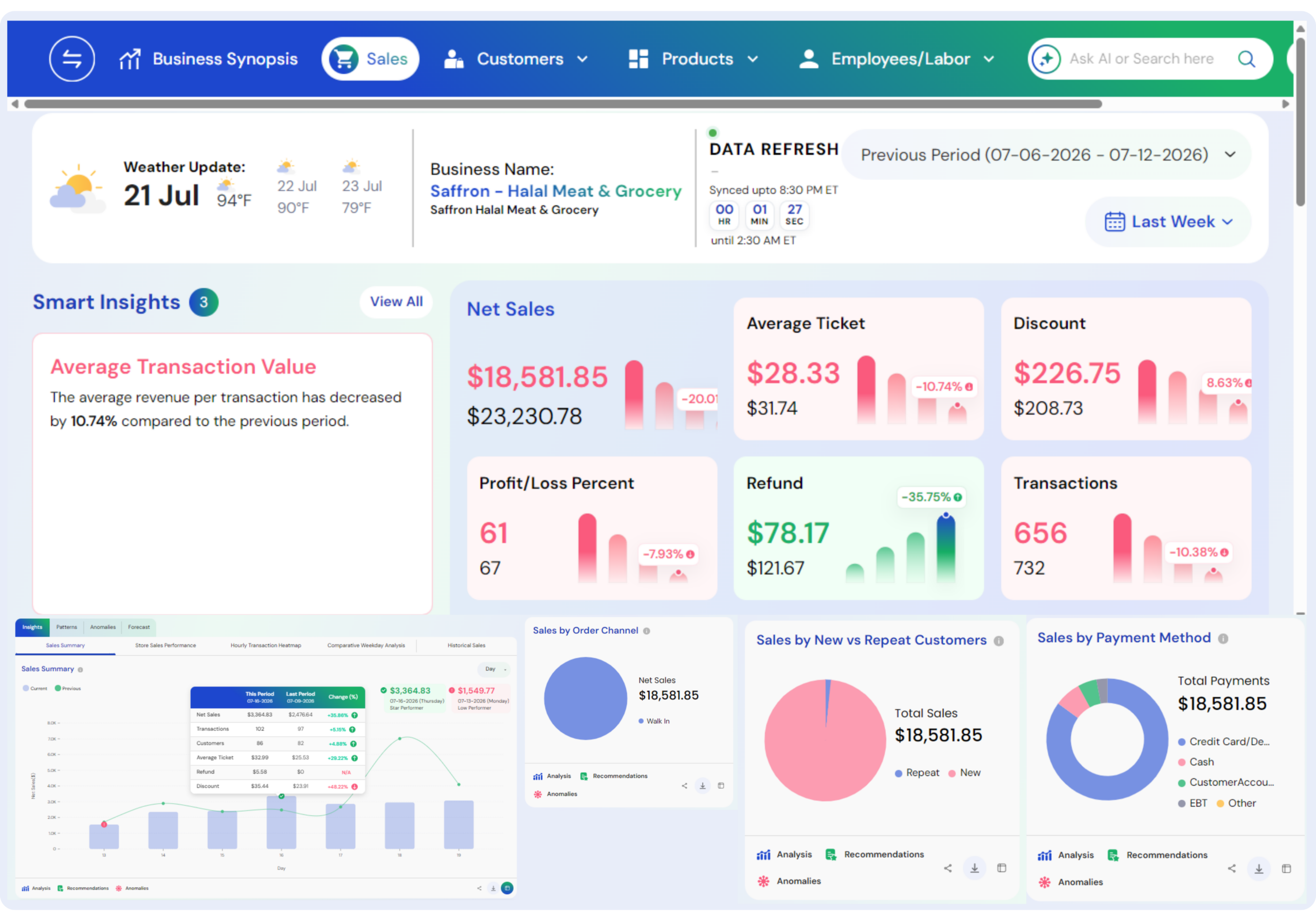
Once the analysis is complete, with automated analytics, you’ll get the results through dynamic dashboards and automated report distribution. These visualizations update in real-time, and you can easily customize them as per the role, department, or function. On top of it, you can even schedule or send reports automatically via email, Slack, or integrated portals.
Business impact: Executives and managers receive timely, role-specific insights without relying on analysts to generate reports manually. It improves agility and speeds up the decision cycle.
Also Read: POS Reports Vs Real-Time Analytics
Benefits of Automated Data Analytics in 2025 & Beyond!

1. Get Insights While Your Coffee’s Still Hot:
In traditional reporting workflows, collecting data from multiple systems, cleaning it, analyzing it, and creating reports can take hours, sometimes even days. With automated analytics, this entire process is compressed into minutes. Instead of waiting for your data team to deliver last week’s sales numbers, you’re looking at today’s trends, all in real time.
Pro tip: Set up automated alerts for key metrics (e.g., low inventory, sales drops) so you can take action before small issues become big problems.
Also Read: Leveraging AI to Collect Customer Insights
2. Say Goodbye to Spreadsheet Mistakes:
Manual data handling is prone to mistakes. There will be misaligned columns, outdated data, and copy-paste errors. These small issues can lead to poor decisions and financial losses. Automation brings consistency, accuracy, and standardization to your data workflows.
What it means for you: Your decisions are only as good as your data. Automated analytics removes the guesswork and ensures every department is working with clean, reliable information.
Did you know, RedDoorz – an Indonesian Hotel brand tracked KPIs across 500 properties without automation. Manual pipelines took up to 15 days to build and reconcile. After deploying an automated analytics platform, they delivered instant insights across pricing, occupancy, and performance, dramatically reducing manual error and turnaround.
Also Read: AI Solutions for Reducing Restaurant Wastes
3. Cut Costs Hidden in Your Data:
Because inefficiencies should never go unnoticed.
Automated analytics doesn’t just deliver insights; it uncovers cost leaks, inefficient processes, and underperforming assets you might be missing. From staffing patterns to supply chain inefficiencies, automation highlights where money is left on the table.
Domino’s – leading food chain used AI and automated analytics to optimize its supply chain and delivery logistics across markets. As a result, they reduced food waste, improved delivery efficiency, and increased customer satisfaction—all while saving millions annually.
Tip for you: Set automated alerts for expense spikes, be it overtime hours, supplier price increases, or product returns.
Also Read: Cost Effective AI Solution for Restaurants
4. Turn Complex Data into Simple, Smart Dashboards:
See everything. Miss nothing.
Automated analytics platforms convert raw data, siloed data into clean, intuitive dashboards, so even non-technical teams can explore KPIs, trends, and performance metrics without relying on analysts.
This simplifies performance tracking, uncovers trends instantly, and aligns departments around shared goals. No need to wait on IT teams or analysts, dashboards update in real-time with zero manual input.
Tip for you: Create role-specific dashboards, finance sees margins, operations sees capacity, and marketing tracks campaigns—all from one central platform.
Also Read: Benefits of Data-Driven Decision Making
5. Reclaim Hours—Focus on Strategy, Not Spreadsheets:
Free up your smartest people from repetitive reporting.
Manual data wrangling eats up countless hours across departments. Automated analytics replaces this grunt work with smart workflows, so your finance team, ops leads, and store managers can focus on planning, not pivot tables.
Mid-size businesses spend over 30% of analytics time just collecting and preparing data. Automation can cut this by 70%. (McKinsey)
Case Study — American Express (Financial Services): AMEX – American Express (the leading financial services provider company) uses automation to streamline fraud detection and customer insights. Their analytics team reduced manual reporting by 40%, freeing analysts to focus on growth-oriented projects.
Tip for you: Audit your reporting processes. Any recurring report that takes more than 2 hours a week is a prime candidate for automation.
Also Read: How Restaurant Analytics and Reporting Drive Better Business Decisions
6. Predict What’s Next—Not Just What Happened:
Let AI tell you where your business is headed.
Automated analytics doesn’t just report the past; it predicts the future. By using machine learning and historical data, it forecasts sales trends, churn risks, customer behavior, inventory needs, and more. This means your team doesn’t have to rely on gut feelings or static dashboards.
Did you know, 74% of organizations are using AI-driven predictive analytics to enhance decision-making processes
Instead, you get actionable forecasts like:
- Which products are likely to sell out next quarter
- Which customers are most likely to churn
- When to scale inventory up or down
- Where marketing ROI is expected to peak or drop
- And so many other things (related to your business and industry)
For decision-makers, this isn’t about “nice to have” foresight; it’s a strategic advantage. You move faster, plan smarter, and mitigate risks before they hit your balance sheet.
A tip for small business owners: Even small businesses can start with basic demand forecasting or churn prediction models. It’s no longer just an enterprise capability.
Also Read: How Predictive Intelligence Transforms Retail
7. Scale Without Growing Your Analytics Team:
Automate the grunt work and let your team focus on strategy.
Hiring and maintaining a large team of data analysts isn’t scalable for every business. Automated analytics platforms bridge that gap by handling data prep, cleansing, and even generating insights automatically.
This allows leaner teams to scale their analytics capabilities without ballooning overhead. It also frees up existing analysts to focus on higher-level strategy rather than repetitive tasks like report generation or ad-hoc queries.
Also Read: What is ad-hoc analysis
8. Canva’s Data Handling Strategy for Smart Scaling:
Canva, a popular design tool known for its rapid global growth, uses automated analytics to manage customer behavior, feature usage, and product experiments across millions of users. With automated reporting and AI-driven segmentation, their small data team serves insights to over 1,000 internal stakeholders, without scaling headcount at the same pace.
Also Read: How Businesses Are Adopting AI In Decision Making
9. Break Down Silos and Align Business Goals:
Unified data = unified direction.
In many growing businesses, data lives in silos, marketing tracks campaign metrics in one platform, sales logs leads in a CRM, finance monitors revenue in spreadsheets, and other stuff. This fragmentation leads to disjointed insights, duplicated efforts, and conflicting reports, making it harder to make informed, strategic decisions.
Automated data analytics platforms solve this by integrating data across all departments, automatically collecting, cleaning, and combining datasets into a centralized analytics hub.
Let’s understand with an example:
Let’s say your marketing team reports a successful ad campaign with high click-through rates. However, your sales team notices that those leads aren’t converting. Without automation, identifying the disconnect is a time-consuming process.
With automated analytics, the system instantly correlates marketing spend with sales conversion data, making it clear that although traffic may be high, lead quality is poor. This allows both teams to course-correct faster, adjusting targeting, refining messaging, or reallocating budget, all based on real-time, shared insights.
Also Read: What is Business Intelligence Why Does It Matter
Top Use-Cases of Automated Data Analytics that Businesses Love!
1. Smarter Sales Forecasting Without Guesswork:
What it does:
Automated analytics pulls data from your CRM, historical sales records, seasonal trends, customer interactions, and even external market conditions. It then uses machine learning to predict sales outcomes and recommend the best next steps, all automated.
How it helps:
And, as a result, instead of relying on gut instinct or manual reports, business owners get accurate, real-time sales forecasts. It highlights which leads are most likely to convert, which products are gaining traction, and where the pipeline needs attention for improved revenue predictability, faster and more confident decision-making, and better resource allocation across teams.
Example:
Imagine a growing B2B SaaS company that sells three different software products. With automated analytics, the sales leader can instantly see that conversions for Product B spike during Q4, especially from healthcare clients. The system flags this and recommends reallocating more reps and marketing budget to that segment, leading to a 15% increase in Q4 revenue without hiring additional staff.
Also Read: How Data-Analytics Improve the Measurement of Employee performance
2. Real-Time Marketing Performance Monitoring (Minus the Manual Work):
What it does:
Automated analytics connects with your marketing platforms, Google Ads, Facebook, email platforms, and your website seamlessly. It tracks metrics like clicks, conversions, bounce rates, and customer acquisition costs to visualize what’s working (and what’s not), without you lifting a finger.
How it helps:
Instead of pulling reports every week or relying on fragmented dashboards, business owners see all marketing performance in one place, updated in real-time. You get automated alerts when cost-per-click spikes or when a campaign outperforms expectations. It helps you maximize marketing ROI, make data-backed budget decisions quickly, and identify underperforming channels before it’s too late.
Example:
Say you’re running campaigns across three platforms. Your automated analytics tool identifies that Instagram ads are delivering leads at 40% lower cost compared to Google. The system sends a daily alert and recommends shifting 20% of your ad budget. You act fast, and your cost per lead drops by 22% over the next month.
Also Read: How Predictive Intelligence Transforms Retail
3. Inventory Optimization Without the Spreadsheets:
What it does:
Automated analytics systems integrate inventory data with sales trends, supplier lead times, and customer demand forecasts. They analyze this data in real time to help you maintain the right stock levels, automatically suggesting reorders or highlighting overstock issues.
How it helps:
Instead of overstocking slow-moving items or running out of bestsellers, business owners get smart inventory recommendations that balance customer demand with cost-efficiency. It reduces excess inventory and avoids lost sales due to stockouts while also improving customer satisfaction and supply chain efficiency.
Example:
A mid-sized retailer with both online and offline presence uses automated analytics to track real-time sales and inventory across 50 SKUs. The system identifies that three items are frequently out of stock in specific regions, costing the business over $10,000/month in missed sales. Once the insights are acted on, the company improves its fulfillment rate by 35% in those regions within two months.
Also Read: AI for Retail Inventory Management
4. Financial Reporting That’s Always Up to Date:
What it does:
Automated analytics tools connect with your accounting software, bank feeds, and ERP systems to deliver real-time, customized financial dashboards. They auto-categorize expenses, track KPIs like EBITDA, and alert you to unusual spending patterns.
How it helps:
Instead of waiting for month-end reports, business owners and finance teams get instant visibility into financial health, cash flow, and burn rate, helping them make faster strategic decisions. It reduces manual financial tasks, speeds the decision, helps with early detection of risks and overspending, while offering recommendations on where you can save.
Example:
A services firm leverages the finance data analytics automation. With this, the CFO gets daily snapshots of revenue vs. expenses, margin trends by service type, and alerts on overdue invoices. The firm reduces time spent on manual reporting by 60% and identifies a cost-saving opportunity worth $80,000 per year.
Also Read: Restaurant Profit Margin Analytics Tools to Boost Profits
5. Enhancing Customer Experience with Real-Time Insights:
What it does:
Automated analytics platforms aggregate customer data from support tickets, chat transcripts, social media feedback, surveys, and NPS scores. They analyze sentiment, identify recurring pain points, and track how changes (like new features or policies) affect satisfaction over time.
How it helps:
Instead of reacting to complaints after damage is done, businesses can proactively improve customer experience by acting on data-driven insights. This leads to better retention, stronger loyalty, faster resolution of service bottlenecks, better alignment between product, marketing, and support teams, and more upsell opportunities.
Example:
A subscription-based platform uses automated analytics to monitor support conversations. The system detects a pattern: a 10% spike in ticket volume every time a new feature is launched. The insight leads to proactive onboarding emails and FAQ content before future rollouts, reducing churn by 18% in three months.
Also Read: How AI Revolutionizes Customer Experience in Restaurant
6. Optimizing Workforce Productivity Without Micromanagement
What it does:
Automated analytics tools track employee performance metrics across systems like project management platforms, time-tracking tools, and communication apps. They surface trends like task completion rates, meeting overload, or underutilized team capacity.
How it helps:
Leaders gain a clear, objective view of team productivity, without invading privacy or micromanaging. This allows for better resource allocation, smarter hiring decisions, and identification of burnout risk areas. It leads to higher team efficiency and accountability, along with smarter workload distribution and better employee engagement.
Example:
A digital agency automates analytics across its PM and time-tracking tools. It notices that one team consistently delivers 20% faster with fewer revisions. On investigation, the team lead has created a task template that’s reused for similar projects. That insight is shared across departments, boosting overall project efficiency by 12%.
Also Read: How Data Analytics Improve the Measurement of Employee Performance
7 Maximize Marketing ROI with Smarter Spend Allocation
What it does:
Automated analytics connects data from ad platforms (Google Ads, Meta, LinkedIn), CRM systems, and website analytics to measure campaign performance in real-time. It automatically attributes revenue to the right channels and identifies which audiences, creatives, and strategies deliver the highest return.
How it helps:
Instead of relying on guesswork or delayed reports, marketing teams can pivot budgets quickly to what’s working, minimizing waste and maximizing returns. It leads to reduced customer acquisition costs and, faster feedback loop for campaign testing and clear visibility into revenue contribution per channel.
Example:
A B2B software company uses automated analytics to track leads by source. The system reveals that while LinkedIn costs more per click, it delivers leads that convert 3x faster. They reallocate 30% of their spend from Facebook to LinkedIn, increasing their marketing ROI by 26% in just one quarter.
Also Read: How AI Helps in Boosting Restaurant Revenue and Profits
8. Proactive Risk Management and Compliance Monitoring
Automated analytics scans internal data, financial transactions, employee activity, vendor records, and audit logs for patterns that indicate fraud, compliance gaps, or unusual behaviors. It flags issues in real-time so leaders can take immediate action.
How it helps:
Rather than reacting after a compliance breach or data leak, businesses can identify red flags early, reducing legal exposure and preserving brand trust, leading to reduced risk exposure, regulatory penalties, and increased trust from investors, partners, and clients.
Example:
A financial services firm sets up automated alerts for irregular vendor payments and high-value transactions outside of business hours. Within weeks, the system detects a suspicious pattern that turns out to be an internal accounting error, saving the company over $50,000 in potential penalties and audit costs.
9. Automate Your Data Analytics without Spending a Fortune with Livelytics!
Livelytics is a cool AI data platform built for modern businesses that demand more insight with less hassle. Designed with cutting-edge technologies like machine learning, predictive intelligence, and automated decision-making, Livelytics helps you extract maximum value from your business data without hiring a full team of data scientists or analysts.
All you need to do is integrate Livelytics with your existing business tools, set your benchmarks, define your processes, and specify your desired outcomes. From there, Livelytics takes over, working around the clock to surface real-time insights, automate complex reporting, and take data-driven decisions powered by predictive intelligence to help you take your business forward.
And the best part? You won’t need to spend months training your team or blow your budget. Livelytics is built for ease of use, has a gentle learning curve, and starts at just $299/month.
Ready to transform your data into action, without the heavy lift? Book your free demo today and see how Livelytics can fit seamlessly into your workflows and then take the decision forward.
Final Thoughts
In this guide, we’ve explored how automated data analytics is reshaping modern business intelligence. We broke down:
- What automated data analytics is and how it works using AI, machine learning, and real-time data processing.
- The benefits for business leaders from cutting operational costs to accelerating decision-making, and improving collaboration.
- Real-world examples and use cases that show how automation drives results across industries.
- How automation integrates into BI and helps you stay agile in a data-driven market.
Now that you understand the value and mechanics of automated analytics, the next step is simple: Put it into action.
If you’re looking for a solution that brings it all together, powerful automation, intuitive design, and scalable results without the complexity or breaking your bank, then check out Livelytics.
Book your free demo and see how Livelytics can help you make smarter, faster, and more impactful decisions with your data. Good Luck.