In the fast-moving hospitality business of today, never has it been more critical to choose the best point-of-sale (POS) system for your restaurant. For a small bistro, food truck, or full-service restaurant, the appropriate restaurant POS system can help to streamline your operations, make your customers happy, and boost your overall profits.
However, out of all the choices available, it’s important to thoroughly understand the various POS systems to choose the right POS for your restaurant and also make the perfect investment. From traditional terminal POS systems to cloud-based POS systems, there is always some option available for every restaurant concept in the market.
Each POS system has distinct characteristics, pricing model, and amount of flexibility. POS systems share some features specifically designed for full-service restaurants (FSRs) such as table management, tipping, and extended reporting, while others are for quick-service restaurants (QSRs) with high-volume transactions.
The most widely used types of POS systems in restaurants are mobile POS, cloud based POS systems, self-service kiosk pos, tablet pos systems, quick service POS, iPad restaurant POS and hybrid models through this article.
Fast food POS systems provide speedy order processing, live inventory tracking, quicker checkouts, sales reports, and less error. They support customer service, automate, and support loyalty programs and promotions.
When searching for the best POS systems for restaurants, it typically involves a combination of hardware, software, and integrations dedicated to the requirements of different types of restaurants (i.e., quick-service restaurants, full-service restaurants, cafes, and food trucks).
By this blog we are highlighting how every system integrates aspects such as inventory management, staff scheduling, online order integration, and payment processing easing the process of choosing the optimal restaurant POS system for your business in 2025 and beyond.
Also Read: Best Marketing Strategies for Restaurants
What Is a Restaurant POS System?
A restaurant POS system comprises a combination of software and hardware intended to oversee sales transactions, order management, and overall restaurant operations.
Livelytics emphasizes that a restaurant POS system is the foundation of restaurant operations, providing smooth communication of front of house (FOH) and back of house (BOH) operations.
Modern POS systems commonly offer integrations for accounting, inventory, scheduling employees, online ordering, and more.
Also Read: Why are so Many Restaurants Closing
POS Features for Restaurants
Here is a clear and organized list of POS features designed specifically for restaurants:
1. Order & Table Management
- Table side order tracking: Servers can use mobile devices to take orders directly at the table and send them to the kitchen, which improves speed and accuracy in operations.
- Digital Floor Plan Management: Managers can create and update floor plans which show the restaurant’s seating, making table assignments more efficient.
- Split Check Functionality: Bills can be easily divided among multiple guests by using different payment methods, ensuring a smooth checkout experience.
- Course Timing: Appetizers, main courses, and desserts can be sent to the kitchen at the right time which enables well-coordinated meal service.
- Real-time table tracking: Staff can track if tables are available, occupied, reserved, or ready for billing, which helps to increase table turnover rates, improve workflow, and improve customer satisfaction.
Also Read: How AI is improving the Table Turnover Rate in Restaurants
2. Menu Management
- Update menu details instantly : enables you to modify menu items, prices, descriptions, ingredients, and menu availability without interrupting daily restaurant operations.
- Create promotional menus : provide limited-time offers, combo meals, happy hour specials, and seasonal dishes to attract new customers and increase sales.
- Synchronize menu changes : automatically across multiple restaurant branches, which ensures consistent food pricing, menu items, and promotions at every location.
- Enable order customization : allowing customers to personalize meals with food options like extra cheese, no onions, additional toppings, spice levels, or diet preferences.
- Improve operational efficiency : by maintaining accurate, up-to-date menus, reducing ordering mistakes, making kitchen coordination smooth, and improving the overall customer dining experience.
Also Read: Food Menu Ideas for Restaurants
3.Inventory Management
- Track stock levels in real time : to track availability of ingredients, avoid food shortages, and prevent expensive overstocking.
- Monitor ingredient usage : for every menu item, which helps restaurants to maintain consistent recipes, control food expenses, and reduce unnecessary food waste
- Receive automatic low-stock and expiry alerts : so restaurants can reorder ingredients on time and reduce spoilage of perishable items.
- Automatically deduct ingredients from inventory: after each sale, which ensures that there are accurate stock records without manual updates.
- Improve inventory efficiency : by maintaining optimal stock levels, simplifying inventory management, reducing food waste, which ensures that the kitchen always has the essential ingredients required to meet customer demand.
Also Read: AI for Retail Inventory Management
4.Kitchen Integration
- Integrate seamlessly with Kitchen Display Systems (KDS) : through which restaurants can replace handwritten tickets and paper order slips with digital order management.
- Automatically route orders : to the correct kitchen station or bar, which ensures chefs and bartenders receive only the orders which are relevant to their preparation area.
- Prioritize and track orders in real time: which allows kitchen staff to track food preparation progress, manage workloads efficiently, and reduce delays during busy service hours.
- Reduce order errors: by removing misread handwriting and improving communication between front-of-house and kitchen teams.
- Increase operational efficiency : by speeding up food preparation, which improves order accuracy, improving coordinating, and offering a faster, more consistent dining experience for customers.
Also Read: Key Metrics Restaurant Owner Should be Tracking
5. Payment Processing
- Accept multiple payment methods: which includes cash, credit cards, debit cards, mobile wallets, and gift cards that give customers the flexibility to pay using their preferred payment option.
- Process QR code and tap-to-pay transactions : quickly and securely by reducing checkout times and offering a fast, contactless payment experience.
- Automatically calculate tips and gratuities: by ensuring accurate billing and also making it easy for customers to reward excellent services.
- Support split bills and partial payments: allowing multiple guests to make payments separately or combine different payment methods for more convenience.
- Enhance checkout efficiency: by simplifying payment processing, reducing waiting times, improving transaction accuracy, and delivering a smooth customer experience.
Also Read: How Restaurant Can Predict Trends With Analytics
6.Staff & Employee Management
- Record employee attendance: by accurately tracking clock-in and clock-out times for every shift.
- Monitor individual performance: by tracking employee sales, productivity, and overall contribution of each employee to restaurant operations.
- Assign role-based permissions : enables control access to POS features which ensures employees can only perform tasks relevant to their responsibilities.
- Simplify payroll processing: by automatically syncing employee working hours and attendance records, reducing manual calculations, improving accuracy, and saving administrative time.
Also Read: How Can Data Analytics Improve the Measurement of Employee Performance
7.Reporting & Analytics
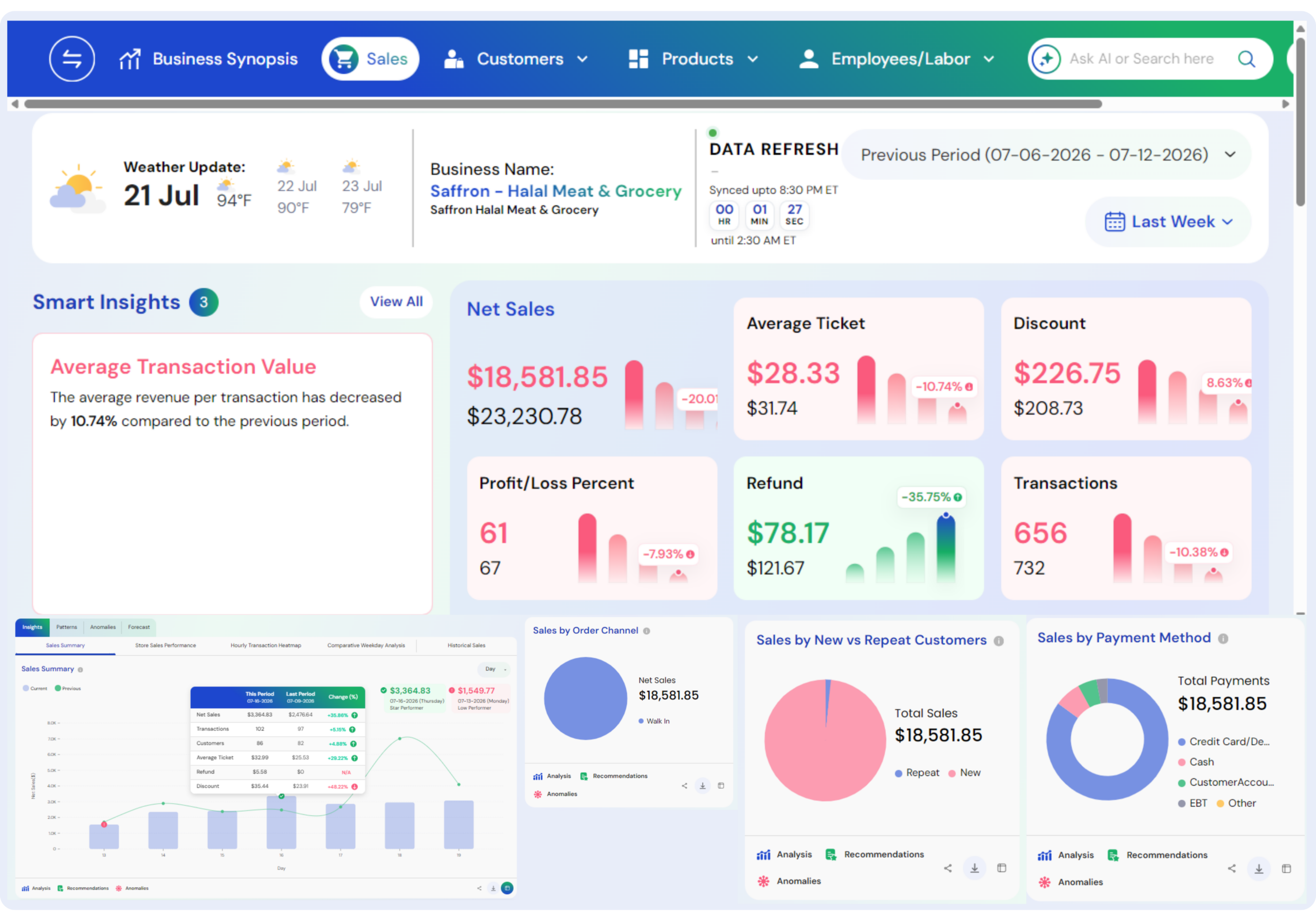
- Generate detailed reports: on sales, labor costs, inventory, and revenue to gain valuable insights into restaurant operations.
- Monitor business performance: through daily, weekly, and monthly reports, helping managers identify trends and make informed decisions.
- Identify peak business hours and best-selling menu items: to optimize staffing levels, menu offerings, and promotional strategies.
- Export reports and customize dashboards: to track key performance indicators (KPIs), measure operational efficiency, and support data-driven decisions that improve profitability and overall restaurant performance.
Also Read: Business Intelligence and Data Analytics Services
8.Customer Management & Loyalty
- Store customer information and visit history: to understand customer preferences, track purchase behavior, and deliver personalized service.
- Manage loyalty programs automatically: by rewarding customers with points, discounts, or exclusive offers based on their purchases.
- Send targeted SMS and email campaigns: to promote special offers, events, new menu items, and personalized promotions.
- Collect customer reviews and satisfaction surveys: to collect valuable customer feedback, improve service quality, strengthen customer relationships, and encourage repeat visits.
Also Read: The Importance of Customer Analytics in Retail
9.Integration with Online Ordering & Delivery
- Accept online orders directly: through your restaurant’s website, providing customers with a smooth ordering experience.
- Integrate with popular delivery platforms: such as Uber Eats, DoorDash, Grubhub, and other third-party services to grow your reach.
- Synchronize online and in-store orders automatically: which ensures all orders are managed from a single POS system.
- Manage dispatch and monitor delivery status: in real time, which improves order accuracy, and thereby reducing delivery delays, and improving customer satisfaction.
Also Read: How AI Unlocks Business Insights that Drive Required Results
10.Mobility & Cloud Access
- Access your POS system from any device: including smartphones, tablets, laptops, and desktops, which allows you to track restaurant operations from anywhere.
- Receive automatic software updates and secure cloud backups: ensuring that your system remains up to date while protecting important business data from loss.
- Continue operating during internet outages: with offline functionality that allows orders and transactions to be processed and automatically synchronized once the internet connection is restored.
Also Read: How to Open a Convenience Store
11.Security & Compliance
- Ensure secure payment processing: by using industry-standard security protocols that protect customer payment information during every transaction.
- Encrypt transactions and customer data: to protect sensitive information from unauthorized access and cyber threats.
- Control staff access: with secure PINs, passwords, or biometric authentication based on employee roles and responsibilities.
- Monitor activity logs: to track user actions, identify unauthorized access, improve accountability, and maintain compliance with data security and payment regulations.
Also Read: What is the Main Reason of Using Data Analytics in Revenue Analysis
Traditional vs. Modern POS Systems : Key Differences
1.Hardware
Traditional POS uses heavy, fixed terminals which remain in one location mostly at the checkout counter. On the contrary, modern POS systems can be operated on tablets, smartphones, or mobile devices, allowing restaurant staff to take orders and process payments from anywhere within the establishment.
Also Read: Livelytics Named Semi-Finalist in Startup Alley
2.Software Updates
Traditional POS software needs manual updates, which can interrupt daily operations and demand more technical support. On the contrary, modern cloud-based POS systems automatically install updates, which ensures restaurants always have access to the latest features, security improvements, and performance improvements.
Also Read: What is Business Intelligence and Why Does it Matter
3.Data Storage
Traditional POS systems store business data on local servers, limiting remote access, while increasing maintenance requirements. On the contrary, modern POS systems use secure cloud storage, which enable restaurant owners and managers to access real-time sales, inventory, and operational reports from any internet-connected device.
Also Read: Two Way Data Analytics in Shaping Retail Business
4.Mobility
Traditional POS systems are stationary and restrict where transactions can take place. Modern POS solutions support mobile ordering, tableside payments, curbside service, and food delivery operations, helping restaurants improve customer convenience and speed up service.
5.Cost
Installing a traditional POS system usually involves high upfront costs for hardware, software, and maintenance. On the contrary, modern POS systems are usually more affordable, providing subscription-based pricing which reduces initial investment while offering regular software updates and cloud services.
Also Read: Retail Pricing Strategy
6.Flexibility
Traditional POS systems provide limited flexibility which makes it difficult to integrate with new applications, customize features, or scale as the business grows. On the contrary, modern POS systems are highly flexible, supporting cloud-based integrations, customizable features, multi-location management, and easy scalability to meet changing restaurant needs and future business expansion.
Also Read: Improved Decision Through Decision Intelligence
Cloud POS vs. On-Premise POS: Key differences.
1. Installation & Setup
Cloud POS systems can be quickly installed and operated on internet-connected devices like tablets, smartphones, and computers. While On-Premise POS systems require dedicated servers, software installation, and specialized hardware due to which the setup process is more time-consuming.
Also Read: How Business Intelligence is Helping Businesses
2. Accessibility
A Cloud POS lets restaurant owners and managers access sales reports and business data from anywhere with an internet connection. On the contrary, an On-Premise POS system usually limits access to the restaurant’s physical location.
Also Read: What is the Main Reason for Using Data Analytics in Revenue Analysis
3. Updates & Maintenance
Cloud POS providers automatically provide software updates, security patches, and new features. While on-premise POS systems require manual upgrades and depend on IT support for maintenance and troubleshooting.
Also Read: Key Metrics Every Restaurant Owner Should Be Tracking
4. Cost Structure
Cloud POS solutions usually involve lower upfront expenses with monthly or annual subscription fees. On-premise POS systems need a high initial investment in hardware and software but generally have fewer recurring subscription expenses.
Also Read: How to Calculate Food Cost Percentage
5. Scalability
Cloud POS systems are highly scalable, as it allows them to easily add new users, services, or restaurant locations. While on-premise POS systems need additional hardware, software configuration, and higher expansion while expanding.
Also Read: How to Increase Restaurant Sales Without Advertising
How Restaurant POS works?
A restaurant point-of-sale (POS) system is the central hub for order processing, payment management, and front- and back-of-house coordination.
1. Order Entry
The process starts when a server or cashier enters a customer’s order into the POS system through a touchscreen kiosk, tablet, or handheld. In quick-service restaurants, this may happen at a counter; in full-service restaurants, it may happen tableside.
A restaurant POS Order Management System controls order entry, routing, tracking, payment processing, and fulfillment for dine-in, takeout, and online ordering.
Also Read: AI for Restaurant Marketing
2. POS System Order Routing
Once the order is put in, the POS posts it directly to the kitchen display system (KDS) or it prints out a ticket on a kitchen printer.
This reduces error and communication delay between waiters and kitchen staff.
Also Read: How Does Data Analytics Help Restaurant Grow
3. Order Management
Order Management for restaurant POS systems simplifies order entry, routing to kitchen, progress tracking, and fulfillment management, guaranteeing efficient service, minimizing errors, and smooth coordination between front and back of house. The POS system keeps a record of active orders, table status, and modifiers (“extra cheese” or “no onions”).
Also Read: Mobile Marketing for Restaurants
4. Restaurant Billing Software Process
Restaurant billing software manages order calculations, tax and discount calculations, bill splitting, tip handling, and payment handling. It provides proper billing, integrates with POS systems, and provides electronic or printed receipts to customers.
Also Read: How Livelytics Can Help Restaurants Boost Revenue
5. Reporting and Analytics
Reporting and Analytics in restaurant POS systems give restaurant owners real-time insights into sales, inventory, staff performance, and customer activity. Through such features, restaurant owners can make informed decisions, optimize business, cut costs, and increase profitability.
Also Read: How Restaurants Can Predict Trends With Analytics
6. Integration with Other Systems
Integration with other platforms such as inventory management, online ordering, accounting software, payment gateways,Customer Relationship Management(CRM), and loyalty programs within POS streamlines operations, provides a better customer experience, and improves overall business efficiency.
It allows real-time data sharing between platforms, releasing it from manual work and improving accuracy. This creates a fully connected system that reduces manual intervention and improves accuracy in all operations.
Also Read: Benefits of Data-Driven Decision
Types of Restaurant POS Systems
1. Legacy POS (Traditional POS Systems)
Legacy POS systems/Traditional POS systems are on-premises software solutions installed on local servers and hardware. They have fixed terminals and cash drawers that typically reside in larger or older restaurants.
One well-known example of a Traditional POS System is Oracle MICROS POS.
MICROS POS is recognized for its strong, hardware-intensive configuration, offline reliability, and enterprise-level customizability. It’s best suited for big operations that require stability and advanced backend functionality without relying on the internet.
How It Works
The data and software are kept on a local server in the restaurant. All reporting and transactions are done in-house, and the system typically needs physical networking and IT support.
Benefits
1.Runs without internet
2.Secure and stable if properly maintained
3.Customizable hardware configuration
Drawbacks
1.High initial cost for licensing and hardware
2.Needs manual updates and on-site IT assistance
3.No remote access to information
Best For
Full-service restaurants, hotel restaurants, and large venues with complicated infrastructure and in-house IT capabilities.
Also Read: Business Intelligence for Restaurants
2. Cloud-Based Restaurant POS Systems
Cloud Point of Sale systems for restaurants operate on internet-connected devices, with all data saved in the cloud. This allows remote access, automatic updates, and seamless scalability.
A prime example of such a system is Toast POS, which is tailor-made for the restaurant sector.
Toast offers end-to-end management options that combine back office and front of house tasks, all being available on any device. Its cloud-based architecture facilitates real-time reporting and remote management, making it a flexible and scalable solution for growing businesses.
How It Works
The system works by enabling employees to accept orders and process payments through tablets, computers, or smartphones, with data being synchronized in real time to a secure cloud server, providing access from anywhere.
Benefits
1.Access real-time reports anywhere
2.Automatic updating and backups
3.Seamless scalability across many locations
Drawbacks
1.Needs reliable internet connection
2.May include monthly subscription fees
Best For
Small to midsize restaurants, cafes, fast-casual chains, and companies that require flexibility and scalability.
Also Read: Business Intelligence for Small Restaurants
3. Mobile POS (mPOS)
A mobile POS for restaurants is a light, tablet- or smartphone-based solution that takes orders and makes payments on the move.
A leading example of an mPOS system is Square POS.
Square POS is admired for its ease of use, affordability, and quick installation—perfect for small or mobile food establishments. You can accept orders and make payments anywhere, with or without Wi-Fi (offline mode included). It also links to other Square services such as online ordering and payroll.
How It Works
Through apps on mobile devices, servers can take orders at the table, process payments at the curb, or manage transactions at pop-up venues.
Benefits
1.Increases speed of service and mobility
2.Lower hardware cost
3.Perfect for line-busting or tableside ordering
Drawbacks
1.Limited functionality if not part of a larger system
2.Could be internet or Bluetooth dependent
Best For
Food trucks, pop-ups, restaurants, and cafes wanting to provide contactless or tableside service.
Also Read: Mobile Marketing for Restaurants
4. Self-Service Kiosk POS
Self-service kiosk POS systems are touchscreen customer-facing terminals where guests can navigate the menu, order, and pay without staff intervention.
One of the top Self-Service Kiosk POS examples is Toast Kiosk.
Toast Kiosk increases productivity and saves labor by enabling guests to order on their own—freeing up employees for food preparation and service. It’s completely integrated with Toast’s larger POS system, offering unified reporting, menu management, and customer insights.
How It Works
Kiosks are installed in-store (usually in QSRs), with customers directly engaging with the system. Orders are sent directly to the kitchen, and payments are made on the spot.
Benefits
1.Accelerates service and lowers labor costs
2.Decreases order mistakes
3.Promotes upsells through visual menus
Drawbacks
1.Initial hardware capital expense
2.Not suitable for every customer base
3.Needs frequent cleaning and maintenance
Best For
Quick-service chains, busy fast-casual restaurants, and airport or mall food courts.
Also Read: Self-Service Data Platform
5. Kitchen Display System (KDS) POS
A KDS-integrated POS system links front-of-house activity to the kitchen through digital screens, removing paper tickets.
One of the best examples of a Kitchen Display System (KDS) POS is Toast KDS.
Toast KDS eliminates paper clutter, streamlines kitchen operations, and reduces errors. It’s perfect for restaurants that want to automate the back of house with real-time communication between the FOH and BOH staff.
How It Works
Digital orders go directly from servers or kiosks to kitchen screens. The system is updated live and assists in kitchen staff prioritization and monitoring of preparation times.
Benefits
1.Enhances kitchen speed and accuracy
2.Monitors food prep statistics and order timing
3.Environmentally friendly (paperless)
Drawbacks
1.Does require initial training and stable screens
2.Higher hardware expense than printers
Best For
High-volume restaurants, busy kitchens, ghost kitchens, and multi-prep station operations.
Also Read: Food Menu Ideas for Restaurants
6. Hybrid POS Systems
Hybrid POS systems blend the dependability of traditional POS with the adaptability of cloud-based systems. They are able to function offline and sync with the cloud when connected.
One of the best Hybrid POS System examples is Revel Systems POS.
Revel’s hybrid design guarantees your restaurant keeps running seamlessly—even without an internet connection. It’s perfect for companies seeking the reliability of on-premise systems combined with the agility and remote access of cloud-based systems.
How It Works
Data and transactions are stored locally when offline and uploaded to the cloud automatically once internet connectivity resumes. Such systems tend to contain both fixed and mobile equipment.
Benefits
1.Offline capability
2.Real-time analytics and remote access
Drawbacks
1.Greater setup and subscription fees
2.More complicated to keep up
Ideal For
Restaurant chains, franchises, or businesses in regions where the internet is poor but there’s a requirement for cloud reporting and remote access.
Also Read: Domo Vs Power BI
7. All-in-One POS Platforms
All-in-one POS systems for restaurants with modules such as inventory management, CRM, online ordering, loyalty schemes, and reporting functionality.
A strong example of an All-in-One POS Platform is Lightspeed Restaurant POS.
Lightspeed combines everything a modern restaurant needs—whether you’re running a single location or a growing chain—into one intuitive and scalable system. It’s ideal for operators who want to eliminate multiple third-party tools and manage their entire business from a unified platform.
How It Works
Everything is on one dashboard. Orders, customer information, payments, and stock are monitored and controlled in real time.
Benefits
1.Smooth integration of several functions
2.Streamlined operations
3.One vendor and support point
Drawbacks
1.Possibly excessive for very small enterprises
2.May be expensive depending on features included
Best For
Growing restaurants, franchise businesses, and businesses seeking ease with complete functionality.
Also Read: Business Intelligence vs Machine Learning
8.Tablet POS Systems
Tablet POS systems are contemporary, mobile alternatives in which tablets, commonly iPads or Androids, are used as the primary interface for handling orders and processing transactions, along with enabling various business functions.
Lightspeed Restaurant is a full-featured tablet POS system designed for restaurants ranging from fine dining to quick-service.
How It Works
Tablet POS systems utilize mobile tablets to facilitate order taking, payment processing, and the management of restaurant operations via cloud-based software and wireless connectivity.
Benefits
1.Simple-to-use interface.
2.Portable with high-functioning capabilities.
3.Less expensive hardware compared to standard systems.
Drawbacks
1.Tablet limitations in heavy-use cases.
2.Can involve third-party integrations for premium features.
Best for
Small to medium-size restaurants, cafes, and pop-up concepts.
Also Read: AI for Expanding Restaurant Customer Base
9. Multichannel/Omnichannel POS Systems
A multichannel POS system allows businesses to accept payments on multiple channels such as online, store, and mobile applications. An omnichannel POS system goes a step further in integrating all these channels to offer a hassle-free customer experience.
Shopify POS is a fine example of an omni channel solution, which integrates in-store and web-based transactions especially for restaurants and is best suited for vendors selling branded goods, meal kits, or merchandise.
How It Works
Multichannel point-of-sale applications unify sales, inventory, and customer information on physical, web-based, and mobile channels such that business activities flow smoothly and as one unit.
Benefits
1.Centralized channel order management.
2.Consolidated reporting and inventory tracking.
3.Improved customer experience.
Drawbacks
1.Can be difficult to implement.
2.May have higher monthly costs.
Best for
Restaurants with online ordering, third-party delivery, or multiple service channels.
Also Read: What is Ad-Hoc Analysis
How to Choose a POS System for a Restaurant?
Choosing the top restaurant POS system in 2025 is crucial to run your business, boost customer satisfaction and profitability. There are many restaurant POS systems available now- with each system having their own set of features-it is crucial that you identify one that meets your particular needs.Read these step-by-step instructions to help you make the perfect decision:
1.Specify Your Requirements
Begin by understanding your restaurant type, whether quick-service restaurant(QSR), full-service restaurant, cafe, food truck, or fine-dining establishment. Identify the features that you need such as table management, online ordering, inventory tracking, delivery management.
2.Select a System Type
Choose between a cloud-based POS system and an on-premise POS system. Cloud-based systems give remote access and easy scalability whereas on-premise systems give more control over data stored locally.
3.Designate a Budget
Evaluate the total cost of ownership like hardware, software, subscriptions, installation, payment processing fees, maintenance, and future upgrades. Choose a solution suitable for your budget without sacrificing important features.
4.Prioritize Features
Look for features like sales reporting, inventory management, customer relationship management(CRM), employee scheduling, payment processing, and integration with third-party applications.
5.Test Usability
Choose a POS system with an intuitive interface that employees can easily learn. As easy-to-use software reduces staff training time, reduces mistakes, and improves operational efficiency.
6.Assess Support
Select a provider that offers reliable 24/7 technical support, regular software updates, onboarding assistance, and employee training to ensure smooth daily operations.
7.Plan Ahead
Your POS system should be scalable enough to support additional users, multiple restaurant locations, expanded menus, and new business requirements when your restaurant grows.
8.Demo Before You Buy
Before making a final decision, test the POS system through a live demonstration or free trial. This helps you evaluate its features, performance, and compatibility with your restaurant’s daily operations.
Conclusion
Selecting a proper POS system for restaurants is required in order to maximize the efficiency, customer satisfaction, and overall revenue of a restaurant.
The different types of POS systems, i.e., on-premise, cloud, and mobile, possess different strengths appropriate for different business operations.
For example, full-service restaurants can opt for sophisticated systems with table management and kitchen display integration, whereas quick service or fast food restaurants need speed, ease, and mobility.
Cloud POS software is flexible, has real-time data analysis, and remote access and hence ideal for expanding companies or companies with more than one location.
Mobile POS hardware is particularly handy for cafes, food carts, or any business that requires tableside service or quick transaction functionality.
Hybrid systems offer on-premises management supplemented with cloud storage, which restaurants that need security as well as access will value.
Finally, your restaurant’s ultimate POS system will differ based on size, level of service, budget, and long-term goals.
Evaluate your existing needs, long-term objectives, and the support level offered by each vendor.
A properly selected POS system will simplify operations, increase customer satisfaction, and equip you with the analytics to make sound decisions.