Many restaurant operators lean heavily on high-level metrics: total chain revenue, marketing ROI, same-store sales, or weekly P&L summaries. But those top-level metrics rarely tell you what’s happening now, on the floor, in a specific location.
For store managers and area managers, that gap is risky. Without the ability to drill down into store-level data, teams are left guessing—“Is this shift underperforming because of staffing, despite a local event? Did waste spike because of supply issues, or mis-portioning? Are we missing an upsell opportunity in this location compared to peer stores?”
By contrast, giving managers real, actionable data at the restaurant level helps them make smarter, in-the-moment decisions that move the needle on profit, guest experience, and consistency.
In this post, we’ll walk through:
- What “restaurant-level data” really means
- How you surface it to store and area managers
- Use cases where it changes behavior
- Obstacles to adoption & how to overcome them
- How a data platform like Livelytics supports this model
1. What Constitutes Restaurant-Level Data?:
“Restaurant-level data” means metrics and insights specific to a single store location (or small cluster), rather than aggregated at the brand or region level.
Some common examples:
| Metric | Why It Matters at the Store Level |
| Hourly sales by POS category | Shows which menu items are trending locally in real time |
| Void / refund / discount anomalies | Detecting unusual patterns (e.g. excessive comps) |
| Food cost, wastage, spoilage | Managing perishable inventory and minimizing shrink |
| Labor efficiency (sales per labor hour) | Helps optimize scheduling dynamically |
| Guest feedback or sentiment (via reviews, surveys) | Enables local corrective action or follow-up |
| Inventory levels & reorder alerts | Prevent stockouts or overstocking for that location |
| Local marketing or promo performance | Assess what’s working (or not) in that specific trade area |
These metrics become far more powerful when paired with context — peer comparisons (how does this store compare with similar ones?), trend baselines (week-over-week, hour-over-hour), and alerting (if something deviates strongly from expected norms).
2. Making Restaurant-Level Data Usable for Store & Area Managers:
It’s not enough to collect data; you must make it accessible, contextual, and actionable. Here’s how:
-
Dashboards with drill-downs:
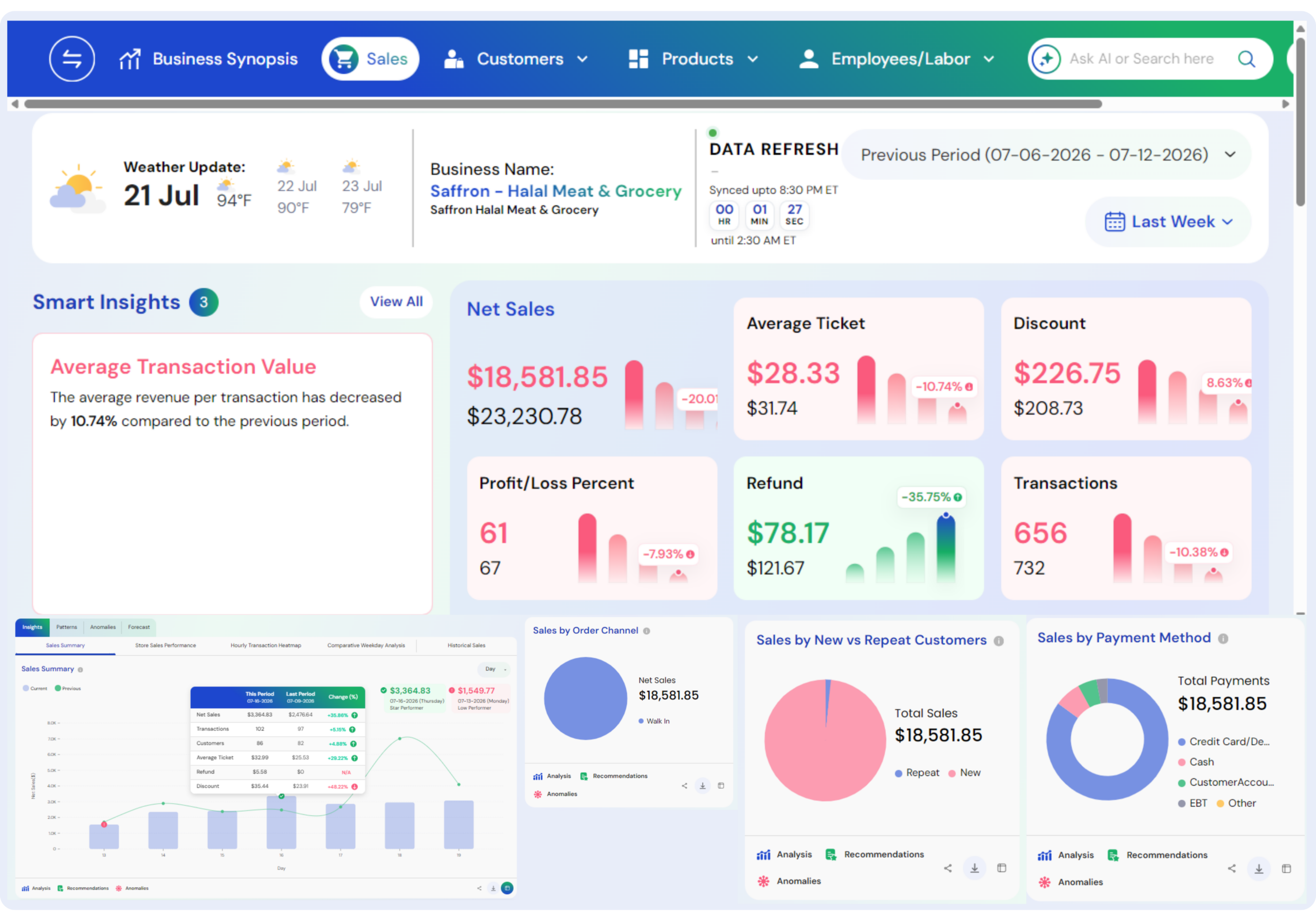
Provide a store-level dashboard that lets a manager see at a glance: “Sales behind vs target? Which categories are lagging? Which items are outselling expectation?” Then allow them to click in and explore by hour, by POS category, or by daypart.
-
Alerts & anomaly detection:
Don’t wait for a manager to notice something is off. Use automated detection (e.g. a spike in comps or waste) to notify the manager immediately. For example: “Your discount rate between 2–3 pm jumped +30% vs last 3 Wednesdays — review comps.”
-
Benchmarking & peer comparison:
If a manager sees that their store’s burger add-on attach rate is significantly below peer stores, that insight triggers coaching or menu adjustments.
-
Mobile / push access:
Often the manager isn’t sitting in front of a computer. Deliver key insights (or alerts) via mobile app or SMS so they can act quickly.
Recommendations & “next-best action”:
Go beyond raw data—offer prescriptive suggestions: “Offer 2-piece combo during kitchen lull,” or “Delay prep of lettuce until midday for freshness.” This is where AI-driven recommendations elevate a data platform from passive dashboard to active coach.
3. Use Cases: Smart Decisions in the Moment:
Here are concrete examples where restaurant-level insights lead to better decisions:
-
Adjust labor or staffing mid-shift:
If sales between 3–4 pm are trending flat, but labor hours are high, the manager may shift staff to prep tasks or reduce front-line team temporarily to avoid overspending on labor.
-
Fight food waste proactively:
If wastage in produce is trending above norm midweek, the manager can reduce planned prep or change promos to push inventory.
-
Detect comp / discount abuse:
If a particular shift shows an abnormal number of customer comps or voids, the manager or area manager can dig into the transactions, identify outlier behavior, and correct it before it becomes systemic.
-
Surge or adjust promos dynamically:
If some menu items are outperforming expectations locally (e.g. a new seasonal item), the manager can promote it verbally or via signage to boost top-line.
-
Localized troubleshooting:
Suppose a store’s fryers go down mid-shift. The data system flags that French fry sales have dropped 40% and the side/dip attach rates are falling. The manager can pivot staff or menu focus while waiting on repairs.
4. Challenges & How to Overcome Them:
Implementing restaurant-level data access is not without friction. Here are common obstacles and mitigations:
| Challenge | Mitigation |
| Data silos & fragmented systems | Use a platform that ingests POS, inventory, HR, CRM, etc. (see Livelytics’s ingestion capability) |
| Overwhelming dashboards | Start small: just 2–3 key metrics that matter most for operations, then expand |
| Resistance or “do-it-my-way” culture | Engage managers early; show them what insights they care about |
| Data latency | Use real-time or near-real-time analytics so data is fresh when decisions need to be made (see Livelytics’s real-time analytics case) |
| Lack of trust in data | Show consistency, backtest insights against known outcomes, audit data sources |
| Analytics skill gap | Provide training, tooltips, “explain this insight” modes; even consider generative AI assistants (e.g. “ask a question” style) to democratize analytics |
5. How Livelytics Enables Restaurant-Level Decisioning:
Here’s where your platform’s features align with the vision above — and where you should pepper in links to let readers go deeper.
- Data ingestion & connection — Livelytics integrates across POS, CRM, inventory, accounting, labor systems, etc., pulling in real-time data so you can have a unified source of truth. (See Livelytics: Data Ingestion)
- Real-time analytics & alerting — The platform enables dashboards and alerts that refresh frequently, so operators can see deviations immediately. (See Real-Time Analytics: Why Your Business Needs It)
- Anomaly detection & automated insights — Livelytics can flag outlier patterns (waste, comps, discounts), reducing the cognitive load on managers.
- AI / recommendation engine — Rather than just presenting data, Livelytics can generate suggested actions or “next best moves” for a location.
- Custom and flexible dashboards — Store or area managers see metrics relevant to their scope, without sifting through irrelevant higher-level reports.
- Custom AI & assistive querying (LivAI) — Users can ask business questions in plain language and get answers without needing to build complex queries (see Custom AI)
- Eliminating data silos — The platform lets you break down disconnected systems and bring everything into a cohesive analytics layer. (See Why Livelytics / breaking data silos)
- Scalable & domain-specific design — Livelytics tailors the analytics model to restaurant workflows so you don’t have to reinvent key metrics from scratch.
By embedding your data platform directly into the pace of store operations, you convert your analytics investment into an operational lever, not just reporting.
In Summary: Empowering Teams with In-the-Moment Data
If you want store managers and area managers to truly “steer the ship,” put the right dashboard, insights, and alerts in their hands — at their level of granularity. That is how you shift from “lagging indicator reporting” to “operational intelligence at the point of action.”
When managers can act mid-shift to course-correct, seize local opportunities, or catch anomalies before they scale, your brand gains agility, efficiency, and consistency across all locations.
Book a demo with us to explore what’s possible.